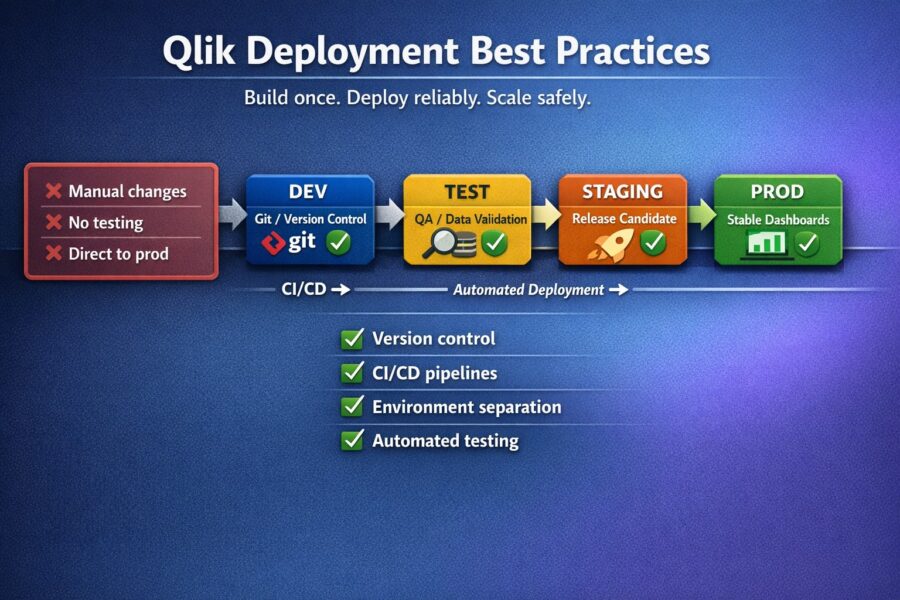
Are you the type of person who deploys Qlik apps by simply exporting a QVF, renaming it, and then importing it to your target environment? If so you’re not alone! In fact, in almost every Qlik team we’ve worked with this is actually a common practice. And in almost every single case, they’ve had to deal with the fallout when something goes wrong and they have to deploy an app in a rush to fix a problem. So for anyone that has “not had to manually remove a broken deployment after trying to deploy a QVF file, while trying to meet a business critical deadline” — congratulations. You’re in the minority.
The fact that we have to manually deploy stuff to production doesn’t necessarily mean that things are broken. No, manual deployments work. They work until they stop working. They stop working when the wrong version is deployed. They stop working when a Friday afternoon deployment breaks a critical dashboard that 200 users rely on for work on Monday. They stop working when the need to roll back to the previous deployment hits when there is nothing to roll back to.
This guide provides information on the processes involved in deploying stable Qlik environments, while having an unstable development environment. This guide applies whether you are a solo developer with five applications or a development team of ten, managing 100 or more applications.
Every Qlik deployment should flow through at least three environments:
One of the more common misunderstandings in the DevOps world is treating DEV and PROD as the same server. Publishing to the stream that the end users see is not a deployment process, it’s simply publishing.
Best practice: We recommend that you use separate sites in Qlik Sense (or separate tenants in Qlik Cloud) for each environment. If budget constraints make it impossible to have separate servers, then we recommend at least having separate streams and strict publish rights.
The golden rule: There should be no developer with publish access to the Production stream. Period.
One of the most common Qlik deployment anti-patterns:
Every step in this chain is a risk:
Best practice: Always develop in the DEV environment from the server, and never from the Desktop. If the former is not possible in specific situations then the latter should be used but only up to the point that the application is re-deployed to the DEV server for further testing before it is promoted to the TEST environment.
Before any app moves from one environment to another, verify:
A written checklist helps catch the typos and errors that often fall through the cracks of memory. It’s an easy one to make better: print it out, pin it to a spot above your keyboard so it’s always in view, and use it every single time.
The minimum viable version control for Qlik apps:
Sales-Dashboard_v2.3_2026-03-15.qvfThis is not great. But this is infinitely better than having no option to roll back at all.
QVF files are binary format, so you can’t diff them. You can’t look at the changelog between versions, say, v2.2 and v2.3 and wonder what changed. If you need to roll back to an older version, you can only hope the blob that made it into the next version isn’t drastically different.
All the above methods have some drawbacks. The best method is to split your application into human readable JSON/YAML sources and commit those to Git. This gives you proper version control of your application. All changes to formulas and variables will appear as single line changes in Git Diff, and you can do proper branching and merging of code (as you would with any other project code in your company). This is where QOps can help, in transforming the Qlik binary format into a more Git friendly, human readable format.
Have a clear definition of how applications move from one environment to another, and make this process approachable to be easily deployed through automated tools, and to be straightforward enough for any member of the engineering team to deploy by hand in an emergency, without relying on “tribal knowledge”.
A solid promotion process looks like:
DEV → (export) → TEST → (validate) → PROD
↓                    ↓
Change log          Sign-off
updated             required
For each promotion:
Who benefits from separation of duties? Anyone whose site experiences unintended changes following a “deploy of the day”. The reason the application was created, is being lost in a single person being both author and deployment specialist. Every time a change is deployed, there are always typos, missing variables or misplaced tags. Even having a second pair of eyes catch these little errors has proven to be a remarkable improvement to reliability.
One of the trickiest parts of Qlik deployment: data connections.
Your application points to the development database in DEV, and to the production database in PROD. When you export a QVF from DEV and import it into PROD, the application references will include the data connections for the wrong database.
Options for handling this:
Sales_DB in every environment. However, on DEV it would be pointing to dev-sql01 and on PROD pointing to prod-sql01.We probably don’t need to say this, but manually editing connections after each import is error-prone and won’t scale.
“It works in DEV” is not a deployment sign-off.
Before promoting to production, verify in the TEST environment:
If you can’t test, you can’t deploy. An untested deployment into production may be expensive enough to buy all the time in the world.
For every deployment to production, record:
This change log becomes invaluable when:
It doesn’t really matter how you document this information; a shared spreadsheet, wiki page or even a Git commit history of the work that has been done will suffice.
Manual deployments don’t scale. Where this holds true is with small organisations with 5 applications and a handful of administrators who are willing and able to follow a small checklist. However with 50+ applications in a deployable software estate and a similar number of people trying to deploy to it on a daily basis, errors will creep in and manual procedures will fall apart.
What can be automated in Qlik deployments:
Full CI/CD for Qlik Sense (or any Qlik product) is a topic that gets debated a fair bit, and with the help of the Repository API and the power of QOps, we can confirm that Full CI/CD is possible. Here is a basic breakdown of what a Full pipeline would typically look like:
This isn’t theoretical — teams are running this today.
This one is really straightforward. Every time you deploy something to production you should be prepared for the question “What happens if this breaks production?” Every deployment should have an answer to this, that is part of the process of doing a deployment in the first place.
Minimum rollback plan:
Better rollback plan:
DatalabsUa builds DevOps tools for Qlik analytics. QOps brings Git-based version control and CI/CD automation to Qlik Sense, Qlik Cloud, and QlikView.



No comments yet.
Leave a comment