Every layer in your data stack has CI/CD. Except one.
Application code lives in Git. Infrastructure is defined in Terraform. Data pipelines run through dbt with pull requests and tests. ML models are tracked in MLflow with version numbers and experiment logs.
And then there is the BI layer: Qlik, Tableau, Power BI. Where business-critical dashboards get deployed by someone exporting a file, renaming it, and importing it into another server. Where “rollback plan” equals hoping someone saved a copy before last Friday’s changes. Where “what changed in the Sales Dashboard this week?” equals a shrug and a Slack thread that goes nowhere.
For a long time, this was fine. BI was at the end of the data chain. The output was a chart on a screen, consumed by a human who could notice when something looked off and ask about it. The reliability bar was low because the blast radius was limited.
That is changing.
Qlik apps used to be the final stop. A human looked at a dashboard, made a decision, moved on. But increasingly, the consumers of BI output are not humans – they are systems.
Consider what is happening right now in enterprises that run Qlik:
When a dashboard breaks in the old world, someone notices that a chart looks wrong and files a ticket. When a Qlik app breaks in the new world, an AI system makes a bad decision because the data underneath it changed and no one flagged it, reviewed it, or approved it.
The reliability bar for the BI layer just went up. Quietly, without anyone officially announcing it.
Qlik Sense stores applications as .qvf files – opaque binary containers. You cannot open them in a text editor. You cannot compare two versions. You cannot see what changed between Tuesday’s app and Wednesday’s app without decomposing them into their component parts, which is not a built-in capability.
This creates a set of concrete problems that compound at scale:
No diffing. If a developer changes a set expression in a master measure and that measure is referenced in 14 charts across 3 sheets, there is no native way to see what changed, where it propagates, or what the previous value was.
No audit trail. “Who changed the Revenue KPI formula last Thursday?” is a question that Qlik Sense cannot answer out of the box. You can see that the app was modified, but not what was modified or by whom at the object level.
No rollback. If a Friday afternoon deployment breaks a dashboard that 200 users depend on Monday morning, you are in for a world of pain. The recovery plan is manual: find a backup if one exists, import it, hope it is recent enough to be useful.
No code review. Changes go from a developer’s local session to production with zero inspection by another person. In application development, this would be unthinkable. In BI, it is standard practice.
Here is a scenario that plays out regularly. A Qlik developer updates a set expression in a master measure called “Net Revenue.” The change looks correct in test – they verify against a single data source and the numbers add up. But the measure is used in 14 charts across the Sales, Finance, and Operations dashboards. In two of those charts, the expression interacts with a different set analysis clause that creates a subtle miscalculation. No one notices for three weeks until Finance flags a discrepancy. By then, nobody remembers what changed or when.
In a version-controlled environment, that change would have been visible in a pull request. A second pair of eyes would have seen the interaction. The deployment would have been traceable to a specific commit at a specific time by a specific person.
This is not about installing a plugin or adding a button. Versioning Qlik applications is an architectural shift in how your team works with analytics code. Here is what it looks like in practice.
Decomposition. A .qvf file gets broken down into human-readable files – YAML and JSON – that represent individual objects. Measures, dimensions, variables, load scripts, sheets, charts. Each one becomes a file you can read, compare, and track.
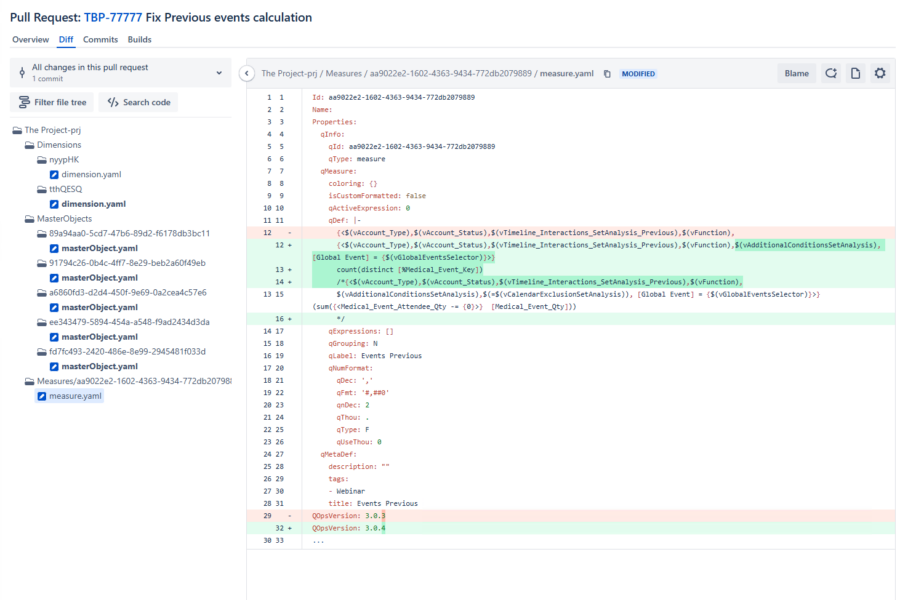
Here is what a real pull request looks like in a production Qlik environment. This is from an actual deployment – not a demo, not a mock-up:
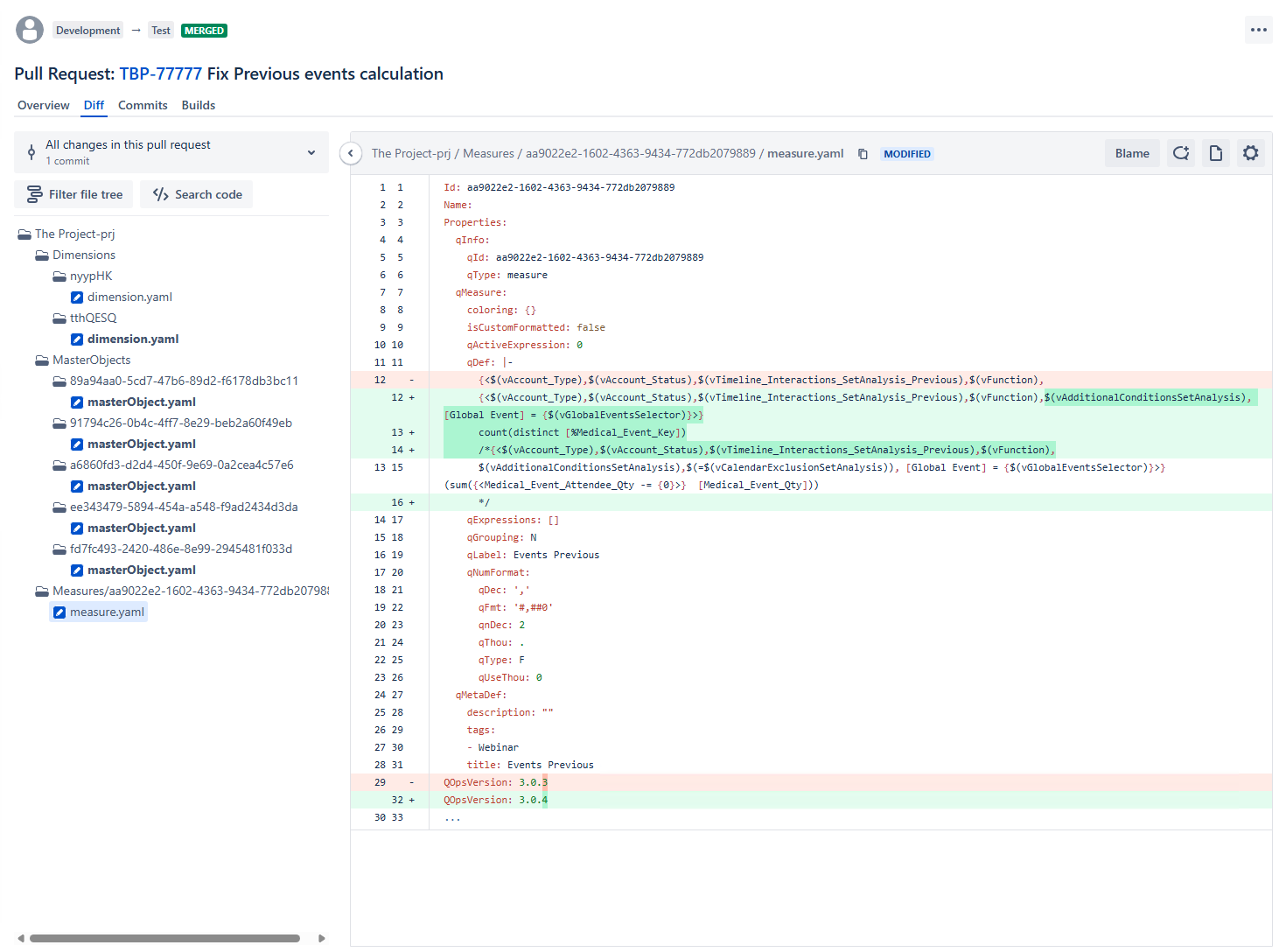
Look at the left panel. That file tree – Dimensions, MasterObjects, Measures – is a decomposed Qlik application. Every object is stored as a separate YAML file that Git can track and compare.
Now look at the right panel. A developer changed a set expression in a measure called “Events Previous.” The color-coded diff shows exactly what happened: two new filtering conditions were added to the set analysis, a new aggregation expression was introduced, and the old version was preserved as a comment for reference. The version increment from 3.0.3 to 3.0.4 was tracked automatically.
That is reviewable. That is auditable. A second developer can look at this and ask: “why are we adding a Global Event filter to this measure? Does it affect the other calculations that reference these variables?” That question gets asked before the change reaches production – not three weeks later when someone notices a discrepancy.
Branching. Two developers can work on the same application at the same time without overwriting each other. Each works on their own branch, makes their changes, and merges through a controlled process.
Promotion. Changes move from DEV to TEST to PROD through a defined pipeline, not a manual export-import. Each promotion is a recorded event with an approval gate.
A mature Qlik deployment pipeline follows the same pattern as any other CI/CD pipeline. Here is a reference architecture:
This is not theoretical. This is what mature Qlik teams do today. The tooling exists and is proven. What makes it work is not any particular technology but the decision to treat Qlik applications with the same discipline that the rest of the stack already receives.
The harder problem is not technical. The tooling for Qlik version control and CI/CD exists and works reliably. The harder problem is organizational.
Most Qlik teams grew up in a world where “deploy” meant “publish from QMC.” Introducing Git-based workflows means several things that are genuinely difficult:
Training developers on Git. A large proportion of Qlik developers have never worked with version control. They come from a business analyst or data analyst background, not a software engineering one. Git concepts like branching, merging, and pull requests are new to them. This requires real investment in training – not a one-hour session, but sustained support over weeks as the team builds confidence with new tools and processes.
Establishing code review culture. In many BI teams, the concept of having another person review your work before it goes to production is foreign. Developers are used to working in isolation with full autonomy. Introducing code review for analytics code can feel like bureaucracy if it is not positioned correctly. The framing matters: this is about catching the kind of subtle errors that are invisible to the person who wrote the code, not about slowing anyone down.
Getting IT to treat Qlik like application infrastructure. In many organizations, Qlik sits in a gray zone between IT and the business. It is managed by the BI team, not the platform engineering team. It does not get the same CI/CD infrastructure, the same monitoring, the same deployment discipline. Changing this requires the CDO or VP of Analytics to make the case that Qlik is infrastructure, not a reporting tool.
This is the point where honesty matters. This transition is not trivial. A team of five Qlik developers will need weeks, not days, to adopt Git workflows and build confidence in the new process.
The question is whether the cost of not making this transition – undetectable changes in a layer that AI workloads now depend on – is higher than the cost of making it. For most organizations with an AI strategy that touches their analytics stack, the answer is becoming clear.
A practical self-assessment:
If three or more of those boxes are unchecked, you are operating your Qlik environment at a reliability level that is below what your organization now requires. Not because you are doing something wrong – because the requirements changed around you while the tooling stayed the same.
The tools to version-control and automate Qlik deployments exist today. They are not experimental. They are running in production at enterprises that made this transition and never looked back.
The patterns are the same ones that every other layer in the data stack adopted years ago. Git for version control. Pull requests for code review. CI/CD pipelines for automated deployment. Audit logs for compliance.
The only thing that is specific to Qlik is the decomposition step – turning .qvf binaries into text files that standard tools can work with. Once that is solved, everything else follows from existing DevOps practices that your organization already understands.
If your Qlik environment is part of your AI strategy – and it almost certainly is, whether officially or not – then treating it like infrastructure is not a future consideration. It is a current requirement.
We built QOps to solve exactly this problem – Git-based version control and CI/CD for Qlik Sense, Qlik Cloud, and QlikView. If your team is evaluating this space, book a 15-minute walkthrough.



No comments yet.
Leave a comment